Slidebox - Photo Cleaner
- 4.5
- Rating
- 500.00K
- Installs
- Free
- Price

 Analysis by App-foxy
My first impression of Slidebox - Photo Cleaner was that it treats photo cleanup as a small, repeatable habit rather than a major organizing project. Instead of asking me to build a perfect filing system before I begin, it puts the decision in front of each picture: keep it, remove it, or place it in an album. That simple approach is the reason I would recommend it to someone whose camera roll has become difficult to manage.
It is a free photography app from Slidebox LLC, available for Everyone and designed for devices running iOS 11 or later. The app has reached over 500 thousand installs, with an average rating of 4.5 from around 12 thousand ratings and 749 written reviews. Those figures fit my general impression: this is a focused utility, not a full photo editor, social network, or cloud gallery. Its value comes from reducing the friction between taking a picture and deciding what deserves to stay.
How the swipe-based cleanup works in real use
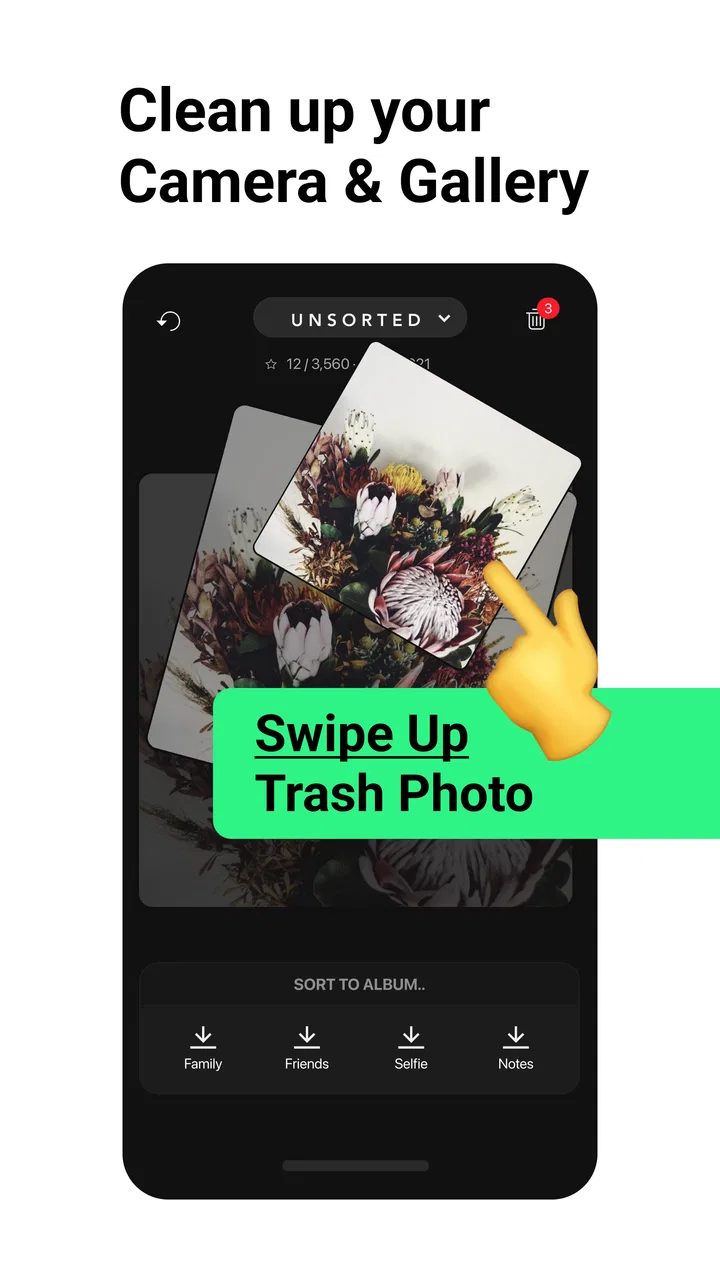
The central workflow is deliberately quick. I can move through images one by one, using a gesture-based decision process instead of opening menus for every file. A photo that is clearly disposable can be removed immediately, while a useful image can be kept and, when appropriate, assigned to an album. The interaction feels closer to sorting a stack of printed photographs than managing a complicated digital archive.
You May Also Like

 Blood Strike: 2.5 Anniversary
Blood Strike’s Loadouts Turn Every Drop Into a Tactical Gamble
A close look at Blood Strike’s custom loadouts: how fast access to signature weapons reshapes its battle royale rhythm, rewards preparation, and narrows the gap between fights.

 Pandora - Music & Podcasts
Pandora’s Music Is Easy to Start, but Harder to Recover
Pandora’s strength is its low-effort path from a seed to a station. Its weak spot is how much confidence it asks you to place in connection, setup, and quiet recovery.

 8 Ball Pool
 Is Built on Rivalries, Rematches, and Routine
A close look at the rivalries, rematches, shared routines, and unanswered safety questions that turn a quick pool match into a persistent mobile community.

 Samsung Music
’s Quiet Strength Is Playing What You Already Own
Its reach comes less from spectacle than from dependable access to a personal library. That simplicity is both the app’s strongest retention engine and its ceiling.

 AccuWeather: Weather Radar
AccuWeather Review: A Quick, Clear Forecast for Everyday Decisions
For everyday plans, the best forecast is the one you can understand quickly. AccuWeather makes rain timing, radar, and local conditions easy to act on, with a few trade-offs.

 Hill Climb Racing
Why Hill Climb Racing Still Turns Crashes Into One More Run
A tiny car, a bumpy hill and one more upgrade: Hill Climb Racing keeps resurfacing because its simple chaos makes every near-miss feel personal.
More From Our News Desk
View All News


That distinction matters because most overloaded camera rolls are not caused by one dramatic mistake. They grow through screenshots, duplicate attempts, accidental shots, blurry pictures, temporary reference images, and several versions of the same moment. A conventional gallery can display those files, but it does not always make the act of deciding feel easy. Slidebox makes the decision itself the main screen.
I found the app most useful in short sessions. Rather than waiting until the camera roll becomes overwhelming, I would use it after a trip, a family gathering, or a day when I had taken many similar pictures. Ten focused minutes can be more realistic than promising myself a complete reorganization on a quiet weekend that never arrives.
One practical routine is to begin with recent images while the context is still fresh. If I took six versions of a receipt, I can immediately recognize which one is readable. If I captured several nearly identical portraits, I can preserve the strongest expression and discard the rest. This is more reliable than trying to remember why a random image seemed important several months later.
The album workflow is also more useful when I give it a purpose. I would not create an album for every small subject. Instead, I would make groups that support something I actually do, such as a renovation project, travel planning, family documents, or pictures I want to share later. The app becomes less about decorative organization and more about making future retrieval easier.
A less obvious benefit is that the swipe format lowers the mental cost of starting. In a normal gallery, I often pause over the whole collection and wonder where to begin. Here, the next image is already waiting. That removes one layer of planning, which is exactly what helps when the problem is procrastination rather than a lack of storage knowledge.
Why this feels different from a normal gallery
The usual phone gallery is better as a broad library. It is designed for browsing, searching, viewing memories, and sometimes editing. Slidebox is narrower and more decisive. It does not try to replace every part of the photo experience; it concentrates on the repetitive work of reducing clutter and assigning selected images to albums.
That focus is its strongest evidence of good design. I do not have to open an image, find an overflow menu, choose an action, return to the grid, and repeat the process. The app’s value is not a large collection of creative tools. It is the speed of moving from one judgment to the next.
For someone who already has a disciplined album system, the advantage may be modest. A person who regularly reviews photos in the standard gallery can achieve similar results without adding another app. Slidebox makes more sense for people who know what they want to do but dislike the number of taps and interruptions involved in doing it.
It is also worth separating cleanup from backup. I would not treat a swipe-to-delete session as a substitute for keeping important memories in a safe backup system. The app is useful for deciding what should remain in the working photo library, but that decision should be made carefully when images are irreplaceable. Before a large cleanup, I would make sure important pictures are already preserved through whatever backup method I trust.
This is one of the most important habits to develop with any deletion tool: begin with obvious clutter, not sentimental photographs. Screenshots of temporary information and accidental captures are good early targets. Family pictures, travel memories, and work records deserve a slower review. The fast interface encourages momentum, but it should not encourage careless decisions.
A realistic everyday workflow
Imagine returning from a weekend away with a crowded camera roll. I would first use the app to remove accidental shots and weak duplicates, then sort the strongest images into an album for the trip. I would leave uncertain pictures alone rather than forcing a decision. Later, after the excitement had faded, I could revisit the remaining borderline images with better judgment.
That two-pass method is more sensible than trying to achieve a perfect result in one sitting. The first pass handles easy wins; the second handles emotional or practical questions. It also prevents a common mistake in photo organization: deleting an image simply because it looks ordinary, then realizing later that it contains a useful detail or a person who was not captured elsewhere.
For screenshots, I would use a separate session. Screenshots usually have a shorter useful life than personal photographs, but their purpose can be unclear when they are mixed together. Sorting them in one batch makes it easier to ask whether each one still serves a purpose. A boarding pass, delivery confirmation, or temporary note should be treated differently from an image kept as a memory.
For album organization, I would avoid moving everything immediately. The strongest workflow is selective: keep the main library manageable, then place only images that will benefit from a dedicated group. This prevents albums from becoming another version of the same clutter. An album with hundreds of loosely related images may be no easier to use than the camera roll itself.
The meaningful limitation: speed can make decisions feel too final
The same simplicity that makes Slidebox appealing can create its biggest weakness. Swiping encourages quick choices, and quick choices are not always wise choices. When I am tired or distracted, I may judge a photo by its first impression instead of considering whether it has value as part of a story, a record, or a future project.
That does not make the app poorly designed; it means the user has to supply the caution. I would avoid using it while rushing to catch a train, during a busy workday, or immediately after an emotional event. The interface is best when I can pay attention to what each image contains.
Another limitation is that this is not the ideal answer for every kind of photo management. If I need advanced search, detailed metadata control, sophisticated editing, face-based organization, or a carefully managed professional archive, I would look to a broader gallery or specialized photography tool. Slidebox is strongest when the problem is visual clutter and indecision, not when the problem is complex cataloging.
There is also a trade-off between convenience and control. A gesture is faster than a menu, but a menu can expose more context before an action. Users who prefer to inspect file details, compare technical information, or review a large batch with precise filters may find the focused interface limiting. I would choose it for momentum, not for forensic control over a library.
The app is free to download, with in-app purchases ranging from $0.99 to $49.99 per item. That makes it easy to try the basic experience before deciding whether the extra purchase options fit my needs. I would judge those purchases by how often I actually clean photos: occasional users may be satisfied without spending, while people who rely on the workflow regularly may see more value in additional paid capabilities.
The current version is 3.17, and the app first appeared on March 30, 2016. I mention that because Slidebox is not a brand-new experiment built around a passing interface trend. It has had time to establish a clear identity as a photo organization tool. At the same time, anyone using an older device should check compatibility carefully, since it requires iOS 11 or later.
Who should use it, and who should skip it
I think this app is a particularly good fit for people who take many everyday pictures but rarely organize them. It suits parents managing school moments and family snapshots, travelers returning with too many similar scenes, and anyone whose phone is full of screenshots mixed with personal photos. It is also useful for people who understand that they need to clean up but become stuck when faced with a dense grid of thumbnails.
It can help a person who prefers visual decisions over text-heavy file management. Looking at each image and making a simple choice feels more approachable than naming folders, assigning tags, or learning a complicated library system. That makes it a friendly starting point for someone who has never developed a photo organization habit.
I would be more cautious about recommending it to a professional photographer, a researcher, or anyone who needs exact control over a large archive. Those users may need more than fast deletion and album sorting. They may be better served by a desktop catalog, a feature-rich gallery, or a storage workflow built around backups and metadata.
I would also skip it if my main goal were editing. Slidebox is not the app I would open to correct exposure, retouch a portrait, add creative effects, or prepare a polished image for publication. Its job is deciding what stays and where selected images belong. Choosing it for editing would be like using a filing cabinet as a drawing desk.
For families sharing one device, I would establish a simple rule before cleaning: each person should review their own important pictures, and nobody should make fast deletion decisions for someone else’s memories. The app can make sorting more efficient, but it cannot know which ordinary-looking image has personal meaning. That human judgment remains essential.
Small habits that make the app more effective
My first tip is to clean by source or purpose rather than randomly. A session devoted to screenshots has a different standard from a session devoted to vacation photos. Mixing both encourages inconsistent decisions, because a disposable reference image and a sentimental snapshot should not be evaluated in the same way.
My second tip is to use albums as destinations, not storage bins. Before sorting, I would decide what an album is for and what it will help me find later. This avoids creating a long list of vague categories that look organized but do not improve access to anything.
My third tip is to stop before decision fatigue sets in. The swipe interface makes it tempting to continue because the next image is always available. I would rather complete a short, accurate session than rush through hundreds of images and regret the last part. The best result comes from consistency, not from one heroic cleanup.
My fourth tip is to begin with low-risk clutter. Removing accidental images builds confidence and creates visible progress. Once the camera roll is less noisy, decisions about meaningful photographs become easier because the important material is no longer buried under disposable files.
Finally, I would keep a separate mental category for images that are useful but not beautiful. A photo of a product label, a measurement, a repair part, or a document may look unremarkable, yet still matter later. The app makes visual sorting fast, so I need to remember that usefulness is not the same as attractiveness.
My final judgment
Slidebox - Photo Cleaner succeeds because it addresses a specific frustration with an interaction that feels natural. I like it most as a lightweight maintenance tool: open it when the camera roll becomes noisy, make clear decisions, place selected images into purposeful albums, and stop before the process becomes careless.
Its weakness is equally clear. The app does not replace a complete photo library, a backup strategy, or an advanced cataloging system. Users who need detailed control may outgrow its focused approach, while people who already keep their camera roll tidy may not gain much from adding another organizer.
For everyone else, especially people with a crowded phone and no patience for complicated filing systems, I think it is worth trying. The free entry point lowers the risk, the Everyone rating makes it broadly approachable, and the strong user response suggests that its straightforward idea connects with many photo owners. I would recommend it to a friend with one condition: use the speed to remove obvious clutter, but slow down whenever a picture might matter.
FAQs for Slidebox - Photo Cleaner
01What is Slidebox - Photo Cleaner, and how does it work?
Slidebox - Photo Cleaner is a photo organization and cleanup app designed to help you review your camera roll more efficiently. It presents images one at a time, allowing you to swipe, tap, delete, favorite, or move photos into albums. This makes sorting large libraries feel faster than manually opening each image through the standard gallery app.
02Can Slidebox permanently delete photos from my device?
Yes, Slidebox can send unwanted photos to your device’s deleted or trash folder, depending on your phone’s operating system and gallery settings. However, deleting an image may not remove it permanently immediately. You should check the trash or recently deleted folder in your Photos app and empty it manually if you want to recover storage space right away.
03Does Slidebox support creating and organizing photo albums?
Slidebox is particularly useful for organizing images into albums. While reviewing a photo, you can generally choose an existing album or create a new one, making it easier to categorize trips, events, screenshots, receipts, or personal collections. Album behavior can depend on whether you use Android or iOS and how your device manages photo permissions.
04Is Slidebox safe to use, and does it require access to my photos?
To sort, move, favorite, or delete images, Slidebox needs permission to access your photo library. On supported devices, you can usually control whether the app receives access to all photos or only selected items. Before using it, review the permission request and the developer’s privacy information, especially if your library contains sensitive or private images.
05Is Slidebox - Photo Cleaner free, or does it require a subscription?
Slidebox may be available to download for free, but some features can be restricted by in-app purchases or a premium subscription. The exact pricing, trial terms, and available tools may vary by platform, region, and app version. Check the store listing before subscribing, and carefully review renewal details if you activate a free trial.
Pros
- Quickly sorts photos with simple swipe gestures.
- Helps remove unwanted screenshots
- duplicates
- and blurry images.
- Albums make organizing selected photos straightforward.
- Supports reviewing large photo libraries in short sessions.
- Clean interface is easy for most users to understand.
Cons
- Some useful features may require a premium subscription.
- Accidental swipes can move or delete photos unexpectedly.
- Automatic duplicate detection may miss similar images.
- Deleting photos may still require emptying the device trash.
- Performance can slow when scanning very large libraries.

Slidebox - Photo Cleaner
Gallery